A back in stock alert watches a product page for the words that mean "you can buy this now", such as "Add To Cart" or "In stock", and tells you when they appear. Most stores don't offer restock emails, and the ones that do send them hours late. A change detection agent checks the page itself.
This example watches the 100 g Banyan Tree silver bar on MMTC-PAMP.
Set up the alert
- Open the agent builder and choose Change Detection.
- Paste the product URL into Page URL, for example
https://www.mmtcpamp.com/shop/silver/silver-bar/banyan-tree-silver-bar-100gm. - Write the prompt:
Alert me when this silver bar goes out of stock or comes back in stock. - Click Set up with AI.
For a stock alert, AI picks a wider area than it would for a price. Here it chose .specific-info-container, the product box that holds the price, the quantity picker and the buy button. It also filled in two keywords from the page: Add To Cart, Out of Stock.
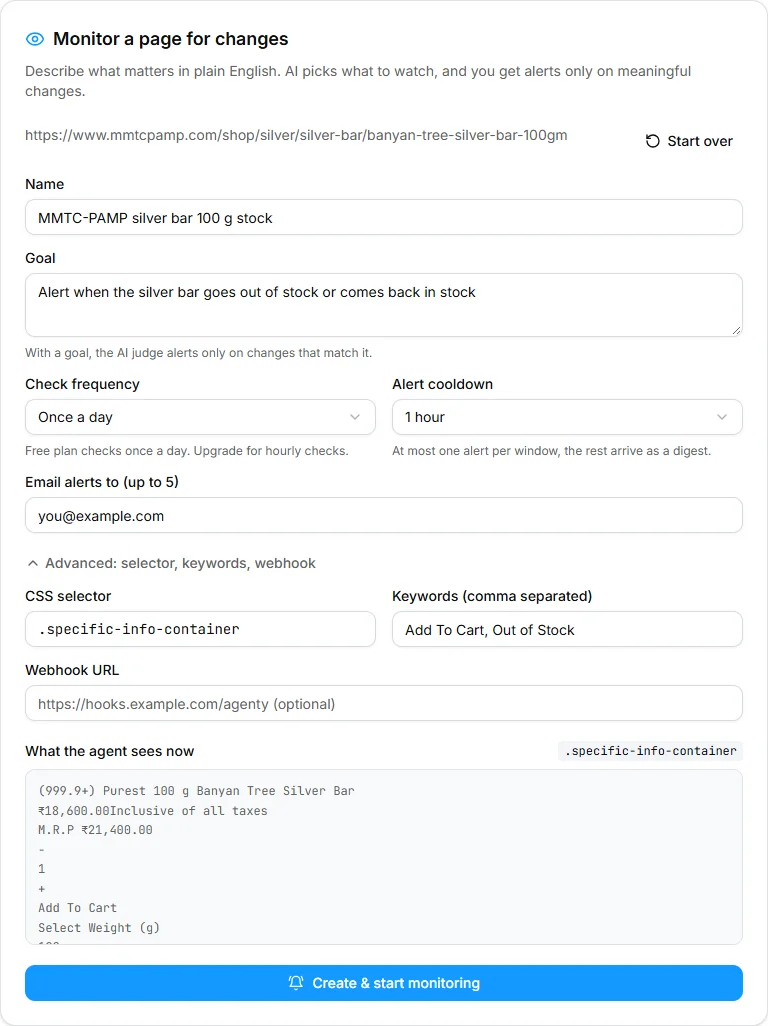
Look at What the agent sees now. The preview includes Add To Cart, which tells you the product is available right now. Click Create & start monitoring.
How keywords work
Without keywords, any change inside the selector is a candidate for an alert, and the AI judge decides if it matches your goal. With keywords, the agent first checks whether a keyword appeared or disappeared since the last check:
- Added (the default) triggers when a keyword is on the page now but wasn't on the last check. Use it with
Add To CartorIn stockto catch a restock. - Removed triggers when a keyword was there last time and is gone now. Use it with
Add To Cartto catch the moment a product sells out.
When a keyword matches and the agent has a goal, the AI judge still confirms that the change fits it before the alert goes out. Keywords are case-insensitive. You can enter several, and a regular expression such as in\s*stock works too. To change the keywords or the trigger later, open the agent, go to Config and edit Keyword Settings.
If you only care about restocks, keep one keyword, Add To Cart, with Trigger on keyword set to Added. Run a second agent with Removed if you also want to know when it sells out.
Check often enough
Popular restocks can sell out in minutes. The Free plan and lifetime plans check once a day, which is fine for slow-moving stock. On Basic, Professional and Business plans, set Check frequency to every hour, or set a CRON schedule from the agent page. Set Alert cooldown to No cooldown so a quick sell-out after a restock still reaches you.
Get the alert where you'll see it
Email works for most people. If you want a phone notification or a message in a team channel, add a Webhook URL and send the event to Slack, Zapier, n8n or your own endpoint. See Change detection webhooks and API.
Watch many products
Create one agent per product page. To set up a list of them quickly, ask Claude or ChatGPT through the Agenty MCP server:
Create back in stock alerts for these product pages. Alert me when
"Add To Cart" appears. Check once a day.
- https://www.mmtcpamp.com/shop/silver/silver-bar/banyan-tree-silver-bar-100gm
- https://www.mmtcpamp.com/shop/gold/lotus-gold-bar-24k-10gm
The assistant calls create_change_detection_agent with keywords and keywords_change for each URL. See Create a website monitor from Claude or ChatGPT.
For a catalog of thousands of products, scraping the stock status into a table with a scraping agent is usually cheaper than one monitor per page.
Related
- Monitor competitor prices with AI tracks the price on the same page.
- How to monitor a website for changes covers every setting.